Why this decision matters
Every other topic in this course depends on this one. If you don't have a clear picture of what a table is, what a row is, and what a key does, every JOIN, every constraint, and every design choice later will feel like guessing. We start with a visual tool (Microsoft Access) and the same tool the Fortune 500 uses (Oracle APEX), so you can see the same concepts in two very different environments.
By the end of this topic you'll be able to
Read and create a table; identify primary keys and foreign keys in an existing schema; run a SELECT against an Access database and an Oracle APEX workspace; explain to a non-technical colleague how relational data is organized.
Materials
Key concepts to know
- Table, row, column — the three primitives. Get fluent in the vocabulary.
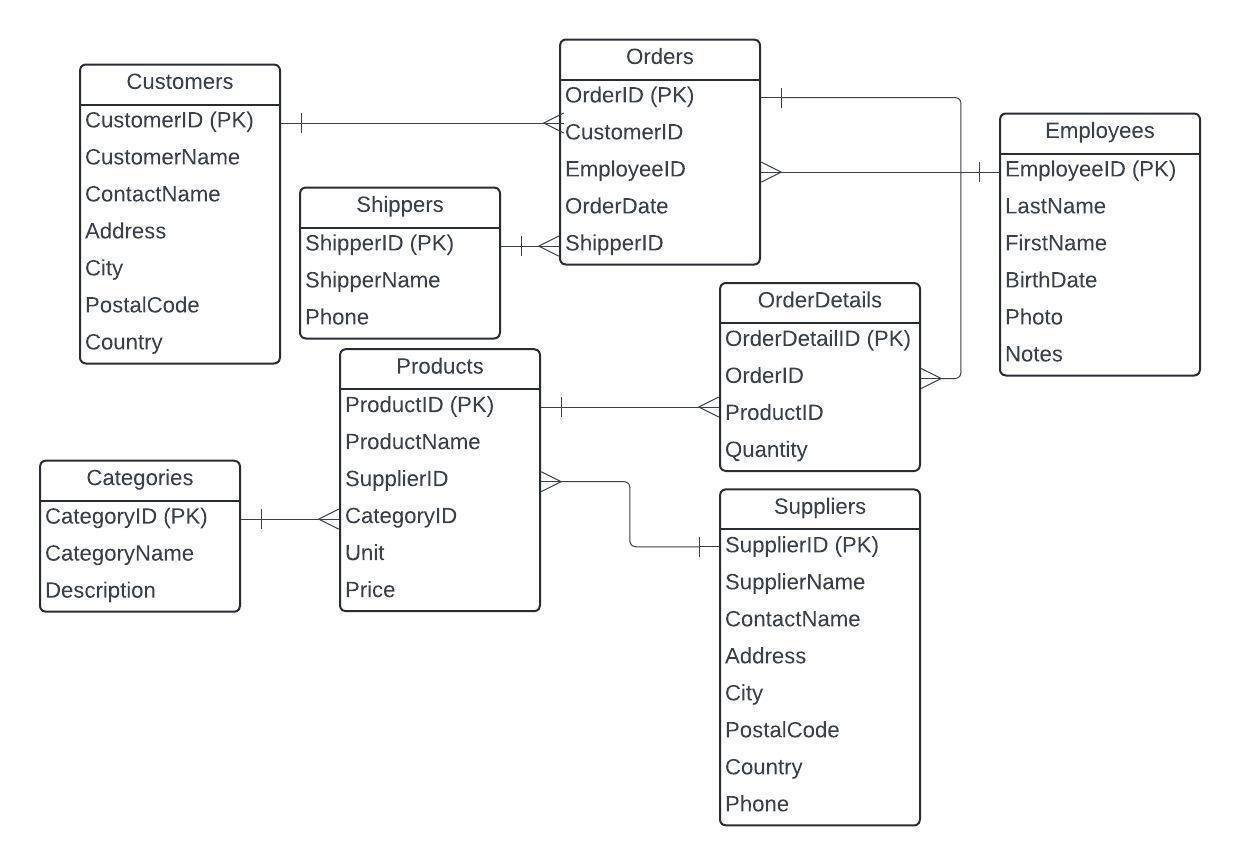
- Primary key — the unique identifier for a row. Single or composite.
- Foreign key — a column that points to a primary key in another table. The glue of relational data.
- Data types — VARCHAR, INT, DATE, DECIMAL, BOOLEAN. Why picking the right one matters.
- NULL — not zero, not empty string, not "no" — it means "we don't know." Behaves weirdly; learn its rules.
- SELECT, FROM, WHERE — the query you'll write 80% of the time.
Practice databases (Access)
Two flavors of the classic Northwind sample database. Open in Microsoft Access to explore tables, keys, and run your first queries visually.
- Northwind-S (Small) — Access databaseSlimmed-down Northwind for quick exploration.
- Northwind-L (Large) — Access databaseFull Northwind dataset with more rows for realistic queries.
- W3Schools ERD diagramReference visual of a basic schema.
Hands-on worksheet
- Week 2 SQL Practice WorksheetIn-class exercises: build SELECT queries against the practice databases.
- Week 2 ICA — Sample SolutionsReference solutions to compare against after you've tried.
Translating business questions to queries
The hardest part of basic SQL isn't the syntax — it's translating "the boss wants to know X" into the right query. This worksheet drills that skill.
- Business Questions → SQL WorksheetPractice converting plain-English requests into precise SELECT statements.